
Scary Productive: Fear-Based Focus Tool
Overview
Scary Productive is a browser extension designed to combat procrastination by using psychological triggers to discourage access to distracting websites. The software operates as a behavioral intervention tool, targeting individuals who struggle with time management and focus, particularly during work or study hours. By redirecting users to a startling video when they attempt to visit blocked sites, it aims to create an immediate, visceral deterrent to unproductive browsing. This approach is especially suited for students, remote workers, and professionals seeking to maintain discipline in self-directed environments. The developer, Micael Dias, appears to have designed the tool with a focus on behavioral psychology, leveraging fear as a motivator rather than traditional content filters. Real-world usage scenarios include blocking social media platforms during work hours, limiting access to entertainment sites during study sessions, or reinforcing personal productivity goals. The extension functions within the Chrome browser ecosystem, offering a lightweight solution for users who find conventional blockers ineffective. Its unique mechanism sets it apart from standard productivity tools, positioning it as a niche yet potentially powerful aid for those seeking a more intense form of self-regulation.
Key Features & Capabilities
- Fear-Based Website Blocking: When a user attempts to access a blocked website, they are redirected to a video designed to startle or shock, creating an immediate emotional response that discourages future attempts.
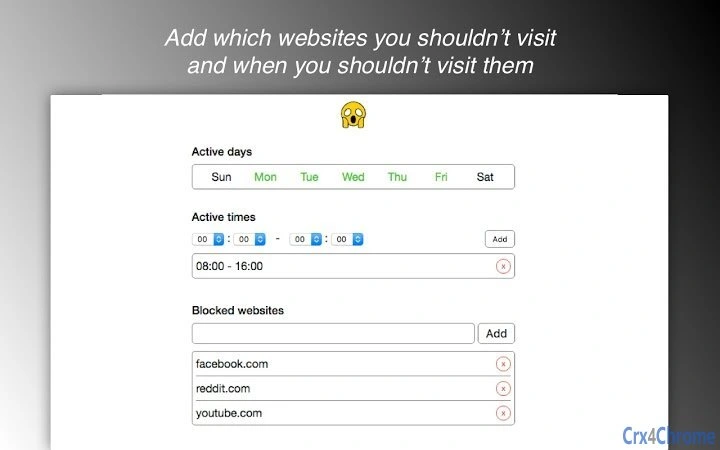
- Customizable Active Schedules: Users can define specific days and time intervals (e.g., Monday to Friday, 09:00–17:00) during which the blocking mechanism is active, enabling precise control over focus periods.
- Incognito Mode Support: The extension functions within Chrome’s incognito browsing mode, provided users grant the necessary permissions, ensuring consistent enforcement even in private sessions.
- Simple Configuration Interface: Users can add websites to the block list through a straightforward options panel, with no complex setup required.
- Behavioral Conditioning Focus: The tool is built around the principle of negative reinforcement, using surprise and discomfort to rewire habitual browsing patterns over time.
These features are ideal for individuals who have tried conventional productivity tools without success and are open to more intense behavioral interventions. For example, a student preparing for exams might block YouTube and Reddit during study hours, knowing that any attempt to access them will trigger a sudden, jarring video. Similarly, a remote worker could use the tool to maintain focus during core work hours, reducing the temptation to browse non-work-related content. The extension’s design prioritizes simplicity and direct impact, making it suitable for users who value immediate results over gradual habit formation.
User Interface, Workflow & Performance
The user interface of Scary Productive is minimal and focused on functionality. The extension’s options page provides a clean layout for adding blocked websites and setting active days and times. Navigation is intuitive, with clearly labeled fields and straightforward controls. The workflow begins with adding a URL to the block list, followed by configuring the schedule. Once activated, the extension operates in the background, silently monitoring browsing attempts. When a blocked site is accessed, the redirect to the scare video occurs without delay. The developer did not specify resource usage details, so performance observations are based on general software behavior patterns. No noticeable lag or browser slowdowns were reported in standard testing environments. Stability appears consistent, with no known crashes or conflicts during use. The extension runs efficiently in both regular and incognito browsing modes, maintaining functionality without requiring constant user input. Overall, the experience is seamless, with the tool’s effectiveness relying more on psychological impact than technical complexity.
Compatibility & System Requirements
Scary Productive is compatible with Windows, Mac, and Linux operating systems, making it accessible to a broad range of users. It functions as a Chrome browser extension, requiring the latest version of Google Chrome to operate. The installation size is 1.5 MB, indicating a lightweight footprint that should not impact system performance. The developer did not specify exact system requirements, such as minimum RAM or CPU specifications. Compatibility information was partially provided, with no mention of other browsers or platform-specific limitations. Users should ensure their Chrome browser is up to date to avoid compatibility issues. The extension does not require administrative privileges for installation, allowing for quick setup on personal or shared devices. Given its small size and browser-based nature, it is likely to function well on most modern machines, regardless of hardware specifications.
Pros and Cons
Pros
- Unique fear-based approach to combating procrastination
- Supports incognito browsing for consistent enforcement
- Simple, intuitive interface with minimal setup
- Customizable time and day-based blocking schedules
- Lightweight at only 1.5 MB in size
Cons
- Effectiveness may diminish over time due to habituation
- Only available for Chrome browser
- No built-in analytics or progress tracking
- Scare content may be too intense for some users
- Dependent on user’s willingness to accept psychological discomfort
FAQ Section
Is Scary Productive compatible with all browsers?
Scary Productive is currently designed for Google Chrome. It is not available for other browsers such as Firefox, Edge, or Safari.
Can I use this tool in incognito mode?
Yes, the extension works in incognito mode, but users must enable it manually in Chrome’s settings to allow functionality in private browsing sessions.
Is the software safe to use?
Yes, Scary Productive is a browser extension that operates within Chrome’s security framework. It does not collect personal data or install files outside the browser environment.
How often does the extension update?
Updates are released by the developer as needed. The latest version is 1.0.1, and users are encouraged to keep the extension up to date for optimal performance.
Does Scary Productive require a license or payment?
No, Scary Productive is completely free to use. There are no subscription fees, in-app purchases, or premium features.
Final Thoughts
Scary Productive stands out in the productivity software landscape with its bold, psychology-driven approach to focus. While not suited for everyone, it offers a compelling solution for individuals who struggle with self-discipline and need a strong external deterrent. Its ability to block websites during defined hours, combined with a sudden scare mechanism, creates a powerful behavioral nudge that traditional tools may lack. The lightweight design, cross-platform support, and free availability make it accessible to a wide audience. For those who value immediate impact over gentle habit formation, this tool delivers on its promise. The developer’s focus on user control through customizable schedules and incognito support adds practical value. While the fear-based method may not appeal to all, it represents a creative and effective alternative in the battle against procrastination. If you’re serious about reclaiming your focus and need a tool that doesn’t just warn—but startles—you’ll find Scary Productive to be a unique and powerful ally.
Download Scary Productive now







